Scheduler: Run Exports Automatically
Most product data gets old fast. Prices change, items go out of stock, new products appear. The scheduler runs your export on its own at the time you set, so you always have a fresh file without starting anything by hand. It is useful for daily supplier feeds, competitor price checks every morning, or a weekly full catalog update.
How to set it up
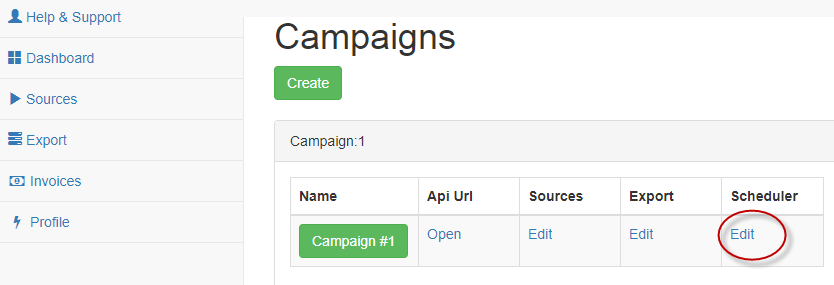
1. Open your profile, go to Campaigns and find the campaign you want to run. In the Scheduler column click Edit.
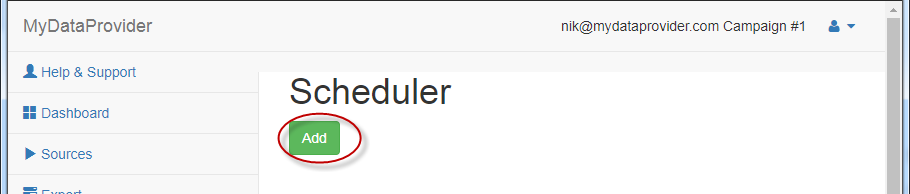
2. Enter the schedule in CRON format and save it. From now on the export starts automatically, and every run creates a new file in your account.
CRON format in short
A schedule is 5 values separated by spaces: minute, hour, day of month, month and day of week. A star means "any".
| Schedule | When the export runs |
|---|---|
0 5 * * * | Every day at 5:00 |
30 7 * * 1-5 | At 7:30 on working days, Monday to Friday |
0 */6 * * * | Every 6 hours: at 0:00, 6:00, 12:00 and 18:00 |
0 3 * * 1 | Every Monday at 3:00 |
0 2 1 * * | On the first day of every month at 2:00 |
Time is server time (UTC). If you need the file by 8:00 in New York, schedule it for about 11:00 UTC and leave enough time for the export to finish. Big catalogs can take from several minutes to a few hours.
Choosing how often to run
- Prices and stock for repricing: every 2 to 6 hours, or once a day if your competitors do not change prices often.
- Supplier feed for a dropshipping store: once or twice a day, so you do not sell items the supplier no longer has.
- Full catalog with descriptions and images: once a week is usually enough, because this content rarely changes.
Running more often than you need does not make the data better, it only uses more of your plan limit. A common setup is a fast daily run for prices and stock, plus a full export once a week.
What happens after the run
The new file appears in your account in the CSV, Excel, JSON or XML format you chose. You can download it, fetch it by a permanent link from your own script, or let our import module load it into your store. If you need a delivery that is not listed here, for example upload to your FTP or a database, write to us.
Scheduled exports are part of the paid plans, see pricing. Every plan starts with a 30 day free trial.
Have a scraping or integration task? Let our AI solve it.
Describe what data you need or which systems to connect — our AI builds and runs the scraper or integration for you. No coding required.
Free for 14 days, no card needed · already have an account?