AI Web Scraping Tool: Describe the Data, Get a Ready File or API Feed
AIScript is the MyDataProvider web scraping tool that works from a plain-English task. You write what data you need and in which format, an AI agent writes a Python scraper, runs it in a cloud sandbox, checks the result and fixes its own errors. You get an Excel, CSV or JSON file with a preview, and you can rerun it on a schedule or pull the latest file from your own code by a permanent API link.
Start a 30-day free trial No card required. Prefer us to do it for you? See the custom web scraping service.
How the AI Scraper Works
There are no selectors to click, no browser extension and no workflow builder. The tool turns a written task into a working program, and the program is what runs every time after that.
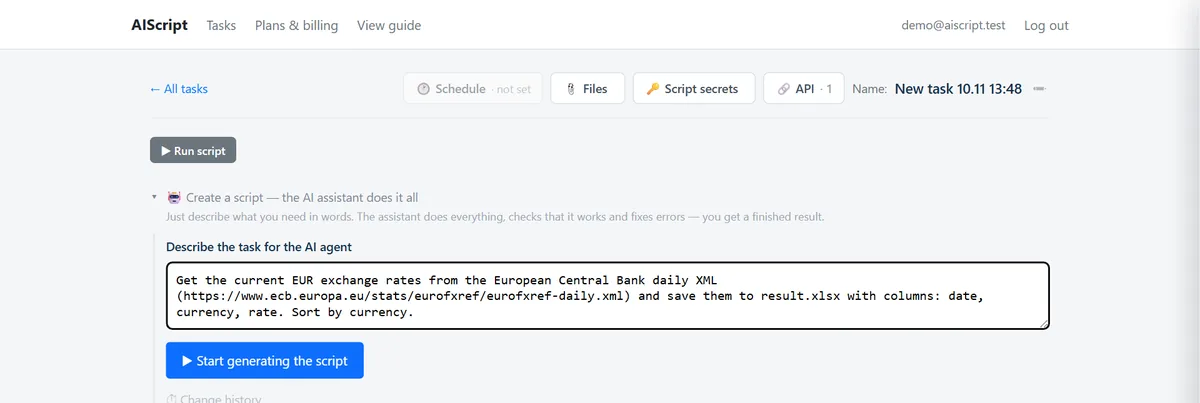
- Describe the task. Paste the page address, list the fields and name the file format, for example: "Collect every product from https://example.com/catalog: name, SKU, price, stock, image URL. Save as result.xlsx."
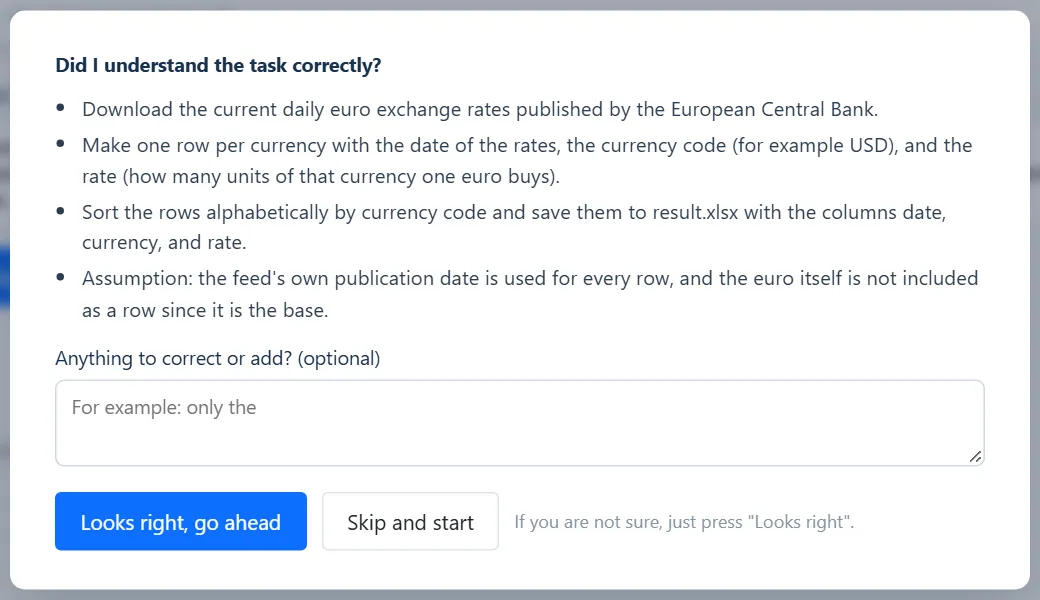
- Confirm the plan. Before writing code the agent restates the task in a few bullet points and lists its assumptions (pagination, login, number format). You correct anything in one sentence or press "Looks right".
- The agent builds and tests the scraper. It opens the site, studies the HTML or the hidden JSON API behind the page, writes Python code and runs it in an isolated Docker sandbox. If a run fails or the data looks wrong (empty columns, missing pages, duplicates), it reads the log and fixes the code before you see the result.
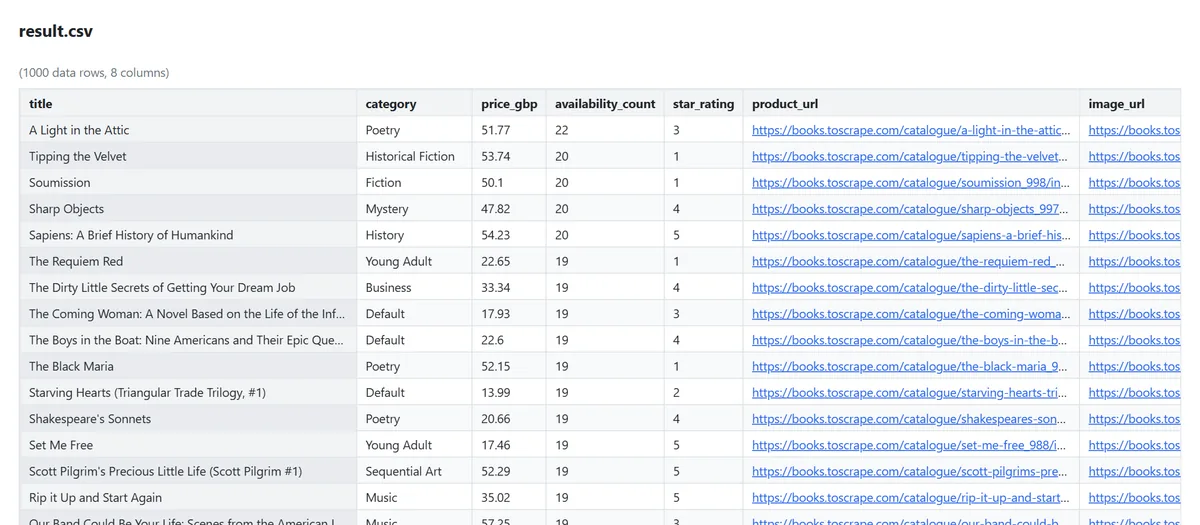
- Get the file. The result opens as a table preview with a download button. The script is saved with the task, so the next run takes seconds of your time, not another AI build.
- Automate. Turn on a schedule (every N hours, daily or weekly) and connect your system to the export API, so a spreadsheet, BI dashboard or store import always gets the latest file.
Watch the Demo
A real build, shortened to 74 seconds: the task, the confirmation, the agent building the scraper (sped up), the run log, the result table, the API keys and the schedule. More recordings on the video page.
What You Can Scrape and Automate
Because the agent writes real code, the tool is not limited to one kind of page. Anything a Python script can read and transform is in scope:
Websites and online stores
Product catalogs, prices, stock, variants, images, reviews, directories, listings, job boards, real estate, news. Pagination, infinite scroll and category trees are handled in the code.
Supplier portals behind a login
Save the login and password as an encrypted secret. The script signs in, downloads prices and stock, and the password never appears in the code or logs.
APIs, JSON, XML and CSV feeds
Pull data from a REST API with your token, merge several supplier feeds, convert a JSON or XML file into a clean spreadsheet, or a spreadsheet into a store import file.
Your own files
Upload API documentation, a sample of the output you want, or a list of URLs, SKUs or keywords. The agent reads these files and uses them in the script.
Typical Tasks
| Task | Example prompt | Usual setup |
|---|---|---|
| Supplier catalog to Excel | "Log in to the supplier site, export SKU, name, category, price and stock for all products to result.xlsx" | Daily schedule + secret |
| Competitor price monitoring | "For each URL in urls.txt get the current price and availability, add today's date" | Every 6 hours, see price monitoring |
| Store catalog for import | "Scrape all products with variants and images and build a WooCommerce import CSV" | One-time or weekly, see products import |
| Lead lists | "Collect company name, website, phone and city from all pages of this directory" | One-time |
| Format conversion | "Download the JSON from this API and flatten it into a CSV, one row per variant" | API link for Power Query, see JSON to Excel |
| Price rules | "Add a column retail_price = price × 1.35, round up to .99, skip items with stock 0" | Part of any export |
Results: Excel, CSV, JSON and More
A script can save any file a Python library can write. The most common are Excel (.xlsx), CSV, JSON and XML, plus ready import files for WooCommerce and Shopify. One run can produce several files at once. Each run keeps its own files, the log and the code version that produced them.
Key Features
Self-correcting AI agent: runs its own code, checks row counts and empty fields, and fixes errors before handing over the result.
Change it in words: "add a brand column", "skip items without price" — the AI edits the saved script and tests it again. Every version is kept in the change history with one-click restore.
Cloud sandbox: each run is an isolated Docker container with browser automation available for JavaScript-heavy sites. Nothing runs on your computer.
Scheduler: every N hours, daily at a set time or weekly. Runs up to about 5 hours each, for large catalogs.
Export API: one permanent URL returns the latest file, or starts a fresh run and waits for it. Works with Excel, Google Sheets, Power BI, curl, Python and PHP.
Encrypted secrets: logins, tokens and API keys are stored encrypted, passed to the script as environment variables and masked in logs.
Memory between runs: a script can keep state files, for example to export only new or changed products since the last run.
Live log: watch the script output while it runs, stop a run at any time, and read the full log afterwards.
AIScript vs Other Web Scraping Tools
Most scraping tools fall into three groups: visual point-and-click builders, browser extensions with AI column detection, and developer APIs billed per page or per request. Each is good at something; here is where an AI agent that writes code is different.
| Visual builders | AI browser extensions | Scraping APIs | AIScript | |
|---|---|---|---|---|
| Setup | Click elements, build a workflow | Open the page, let AI suggest columns | Write code around the API | Write the task in plain English |
| Multi-step logic (login, pagination, detail pages, merging sources) | Possible, gets complex | Limited to what the extension sees | Yes, in your code | Yes, the agent writes it |
| Runs without your computer | Cloud plans | Mostly in your browser | Yes | Yes, cloud sandbox |
| Data transformation (formulas, import formats) | Basic | Basic | Your code | Any, described in words |
| When the site changes | Rebuild the workflow | Rerun AI detection | Fix your code | Ask the AI to fix the script |
| Pricing model | Tiers by tasks and pages | Credits per row or page | Per 1,000 requests | $20/month flat, see pricing |
If a site has strong anti-bot protection or you need a guaranteed data feed with monitoring, our team can build and maintain the scraper for you: see custom web scraping and the list of ready scrapers by site. To try a store without registration, use the free online store exporters (WooCommerce, Shopify, Magento and others).
Pricing
One plan covers the tool and the store exporters: $20 per month with 20 AI scraper builds a month, scheduled runs and the full output of every run. Running an existing script, by hand, by schedule or through the API, does not use AI builds. Every account starts with a 30-day free trial without a card; during the trial and on the free tier you see and download the first 50 rows of each result. Details on the pricing page.
Documentation
- User guide: tasks, writing good prompts, runs, editing with AI, code history, files, secrets, price rules.
- Scheduler: automatic runs and how often to scrape.
- Export API: get the latest file or a fresh run over HTTP, with code examples.
- Output samples: CSV, Excel, JSON, XML.
- Videos and the FAQ.
Have a scraping or integration task? Let our AI solve it.
Describe what data you need or which systems to connect — our AI builds and runs the scraper or integration for you. No coding required.
Free for 30 days, no card needed · already have an account?
Frequently Asked Questions
What is the best AI web scraping tool for non-programmers?
The one where you only describe the result. In AIScript you write the page address, the fields and the file format in plain English; the AI agent writes, runs and tests the scraper and gives you an Excel, CSV or JSON file. You never touch selectors or code: to change the scraper later, you describe the change in words too.
Can it scrape websites that need a login?
Yes. Save the username and password as encrypted secrets of the task and mention in the prompt that the site needs a login. The script signs in on every run; the values are masked in logs and are not written into the code.
Does it work with JavaScript-heavy sites?
Yes. The agent first looks for the JSON API the page loads its data from, which is faster and more stable. If there is none, the sandbox has a headless browser for pages that render content with JavaScript.
How do I get the data into Excel or Google Sheets automatically?
Turn on the schedule and create an API key for the task. The export URL always returns the latest file, so Excel Power Query, Google Sheets IMPORTDATA or a BI tool can refresh from it without any manual download.
What happens when the website changes its layout?
The scheduled run fails or returns empty fields and you see it in the run history. Write one sentence like 'the price is now in a different place, fix the script' and the agent repairs it, or restore an earlier version from the change history.
Is web scraping with this tool legal?
Collecting publicly available data is generally allowed, but you are responsible for respecting the site's terms of use, copyright and personal data laws such as GDPR. Do not scrape personal data without a legal basis.
What was Runner?
Runner was our previous web scraping tool, built around ready source configurations and campaigns. AIScript replaces it: instead of choosing a prebuilt source you describe any site or feed, and the AI builds the scraper for you.