Excel Export Sample
The Excel export is the same product data as our CSV, saved as a real .xlsx workbook. It opens with one click, without any import settings, so it is the most convenient format if a person and not a program is going to read the data: a buyer checking a supplier catalog, a manager comparing prices, an analyst building a quick report.
Download
The sample has 5 demo products from a clothing store, with variants, a sale price and one item out of stock. Your export will look the same, just longer.
What is inside the workbook
- One sheet called "Products". The first row is the header and it stays on top while you scroll.
- Filters are already turned on for every column. Click the arrow in "categories" to see one category, or in "in_stock" to hide items that are sold out.
- Prices, stock and ratings are stored as numbers, not text. You can sort by price, use SUM or AVERAGE and build pivot tables right away.
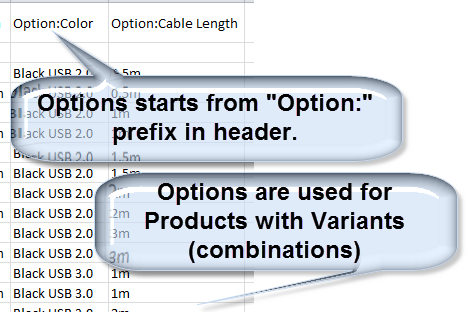
- Products with variants take one row per variant, the same as in CSV. Each row has the variant SKU, options, price and stock.
- Image and product links are plain text, so they do not turn into thousands of hyperlinks and the file stays fast.
The columns are described on the CSV sample page. Excel and CSV exports always have the same set of columns, so you can switch between them later without changing anything on your side.
A few practical tips
- To get a list of products without variants, filter "variation_id" by empty cells, or remove duplicates by "id".
- To compare your prices with a competitor, put both exports on one sheet and use XLOOKUP by SKU or by product name.
- Very long descriptions are cut at 32,000 characters, this is the Excel limit for one cell. The full text is always kept in CSV, JSON and XML.
- If you need to load the data into a store, use the WooCommerce or Shopify import CSV instead. Excel files can not be imported into most shop platforms directly.
Screenshots
An older export with the same structure, split into sections.
Standard fields
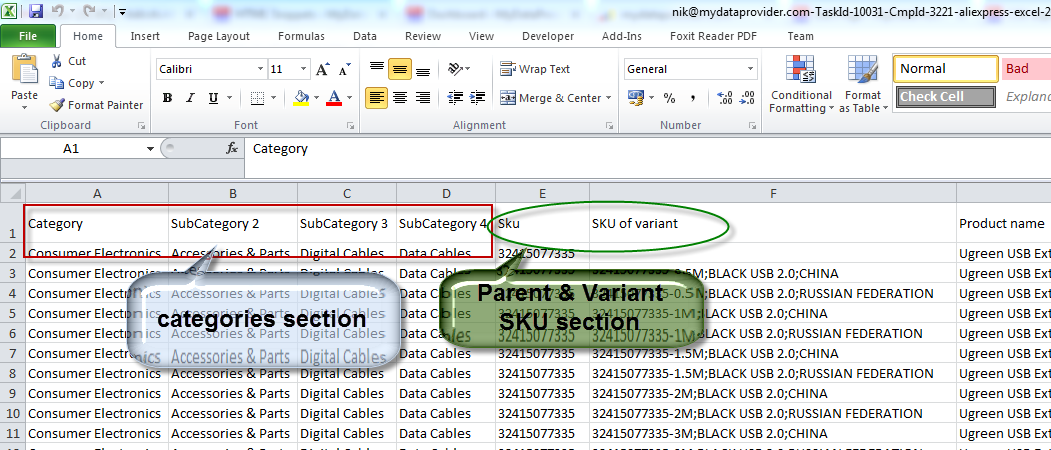
Categories

Description and weight

Images and product URLs

Variant options
You can get an Excel file of any WooCommerce, Shopify or other store with our free online exporters. For regular updates, for example a fresh file every morning, use the scheduler.
Have a scraping or integration task? Let our AI solve it.
Describe what data you need or which systems to connect — our AI builds and runs the scraper or integration for you. No coding required.
Free for 14 days, no card needed · already have an account?